Explain Everything – ¿Qué? ¿Por qué? ¿Cómo?
| Site: | Digitalising VET: The Flipped Work-Based Learning |
| Course: | Kit de herramientas en línea para el aprendizaje basado en el trabajo invertido (ES) |
| Book: | Explain Everything – ¿Qué? ¿Por qué? ¿Cómo? |
| Printed by: | Guest user |
| Date: | Monday, 14 September 2026, 6:11 AM |
Description
Explain Everything es un sistema de pizarra digital diseñado para el mundo escolar.
1. Introduction
2. WHAT?
Explain Everything is a digital whiteboard system built for the classroom and beyond. It is a digital whiteboard that is directly aimed at helping teachers and students’ express ideas clearly. Unlike some other solid-state whiteboards, this is an online-based platform that supports teachers working in the classroom as well as those working remotely. That makes this ideal for a hybrid classroom setup.
What makes Explain Everything unique?
- Mixed-media playground on an infinite canvas
- Real-time and asynchronous collaboration
- Voice chat
- Recording, animation, and video editing
- Sharing recordings via Web Video Links
Things you can do with Explain Everything
- Collaborate and whiteboard together in real-time with voice chat on any device, anywhere.
- Present on an interactive canvas for immediate control over your content.
- Create videos – just-in-time messages, stories, tutorials, and explanations by capturing your interactions and voice.
- Share your projects as images, PDFs, videos, or editable projects. Share them as Web Video Links so others can stream your Explain videos.
3. WHY?
|
Explain Everything lets teachers, or students, create presentations that pull in rich sources of media, from images and audio to videos and websites. Thanks to compatibility with services such as Dropbox, Google Drive, and iTunes – to name a few – there are many ways to pull in media from personal devices. Crucially, this system is created for students also, with collaboration features, making it a great way to integrate digital skills learning with subject specific presentations.
|
|
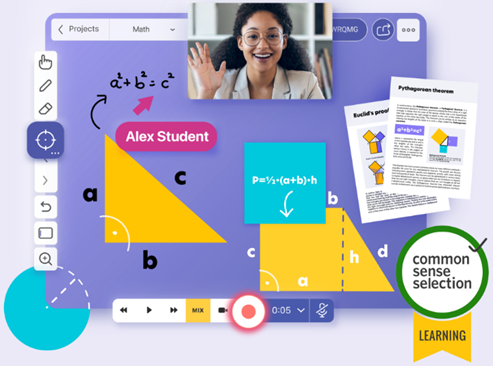
Explain Everything is designed to help you share your thinking, both locally and remotely, no matter the distance. It can be used in any situation when you need to either get your own thoughts together or get your message across. Communication can span across many disciplines in both education and business.
Who uses Explain Everything?
- Tutors and consultants
- Trainers and teachers
- Graphic and visual facilitators
- Storytellers and music teachers
- Continuous and visual learners
- Inside and field sales professionals
- Product developers and user-experience designers
- Active learning organizations and universities
- People that need to explain or present complex concepts and connect with their audience
Explain Everything best tips and tricks:
- Teach a lesson on video: By creating a video that works through an activity, saying when to pause, a student can be taught as if you were there. Show a sentence in another language, ask which words are verbs, then highlight the answers after a short pause break.
- Use in class: Doing a science experiment? Have students take photos and record audio along the way to explain how it all worked as part of a homework submission for after the class is done. This could apply to more than just science classes too.
- Work within Canvas: Explain Everything works with Canvas so you can use the learning management systems (LMS) and set up an online whiteboard within that.
4. HOW?
Explain Everything is primarily an app. It is best accessed from the dedicated app for the device in use, be that an iPad, an Android device, or a Chromebook.
To get started simply select the "Start Whiteboarding" option and you are immediately underway with the New Project page. Here you can decide to start from a blank canvas or pick from the template options available. You can also call up files and work from there.
If you pick a template, you are immediately placed into the editing page, and a pop-up will appear offering to guide you through the basics. This explains how to pull in media such as images, videos, clipart, documents and more. The sidebar tools are also explained with moving, drawing, zoom and pan, plus record being clarified.
Explain Everything offers one user account that is totally free. This is limited to three projects, one slide per project, and video exports limited to one minute. It works on any device, has collaboration with voice chat, web video link sharing and 500 MB of cloud storage.
- The Teacher account is $24.99 per user, per year and works for between one and nine users. This offers all the above plus unlimited projects, slides, and recording, 1 GB of cloud storage, user and license management, plus shared folders.
- The Class plan is $8.99 per user, per year and works for 10–100 users. This gets you all the Teacher features plus MDM deployment and advanced security and permissions.
- The School and District tier is for more than 100 users and is charged at a custom price. This gets you all that Class offers plus priority support, training, reporting, custom clipart and custom templates.